
When you hear terms like DAU, MAU, churn, or activation, it can feel overwhelming. These aren't just buzzwords; they are vital signs that tell you what's happening inside your mobile application. Understanding them is the first step, but the real goal is improving them.
This guide will demystify the most important mobile app metrics. We won't just define them; we'll provide actionable strategies to improve each one using targeted, value-driven push notifications. Using a visual workflow builder like PushFire, you can turn these strategies into automated campaigns that drive real results.
In this guide, you will learn:
- Clear, concise definitions for the 7 most critical mobile app metrics.
- Specific push notification strategies to improve activation, reduce churn, and boost retention.
- The truth about "vanity metrics" like DAU and how to use them correctly.
- How to segment your audience for more precise and impactful messaging.
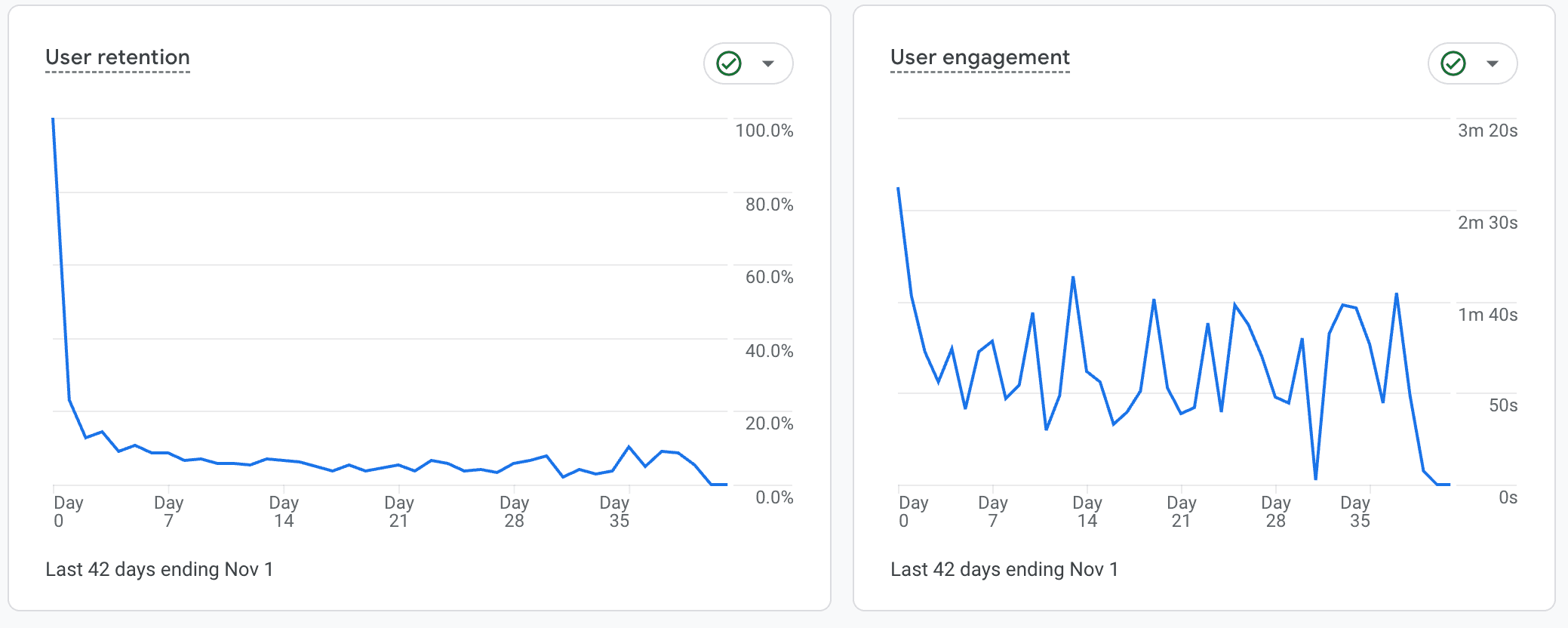
Defining the North Star Metrics for Your Mobile App
Before you can improve your metrics, you need a standardized definition for each. The table below breaks down the key performance indicators (KPIs) for most mobile apps.
- Activation
- Definition: A user completes a specific set of actions that prove they've experienced the core value of your app (the "Aha! Moment").
- Why It Matters: An activated user is far more likely to be retained. This is the bridge between a simple download and a loyal user.
- Retention
- Definition: The percentage of users who continue to use your app over a specific period after their first session.
- Why It Matters: High retention is the foundation of sustainable growth. It's more cost-effective to keep a user than to acquire a new one.
- Churn
- Definition: The percentage of users who stop using your app over a specific period. This is the inverse of retention.
- Why It Matters: Churn is the "silent killer" of apps. A high churn rate can negate all of your user acquisition efforts.
- Conversion
- Definition: A user completes a single, high-value action, such as making a purchase, starting a subscription, or signing up.
- Why It Matters: Conversions are often tied directly to revenue or primary business goals.
- DAU (Daily Active Users)
- Definition: The number of unique users who open your app at least once within a 24-hour period.
- Why It Matters: Indicates daily engagement and habit formation. It's critical for social media, news, and communication apps.
- MAU (Monthly Active Users)
- Definition: The number of unique users who open your app at least once within a 30-day period.
- Why It Matters: A broader measure of your app's overall user base and "stickiness." It's relevant for almost all app types.
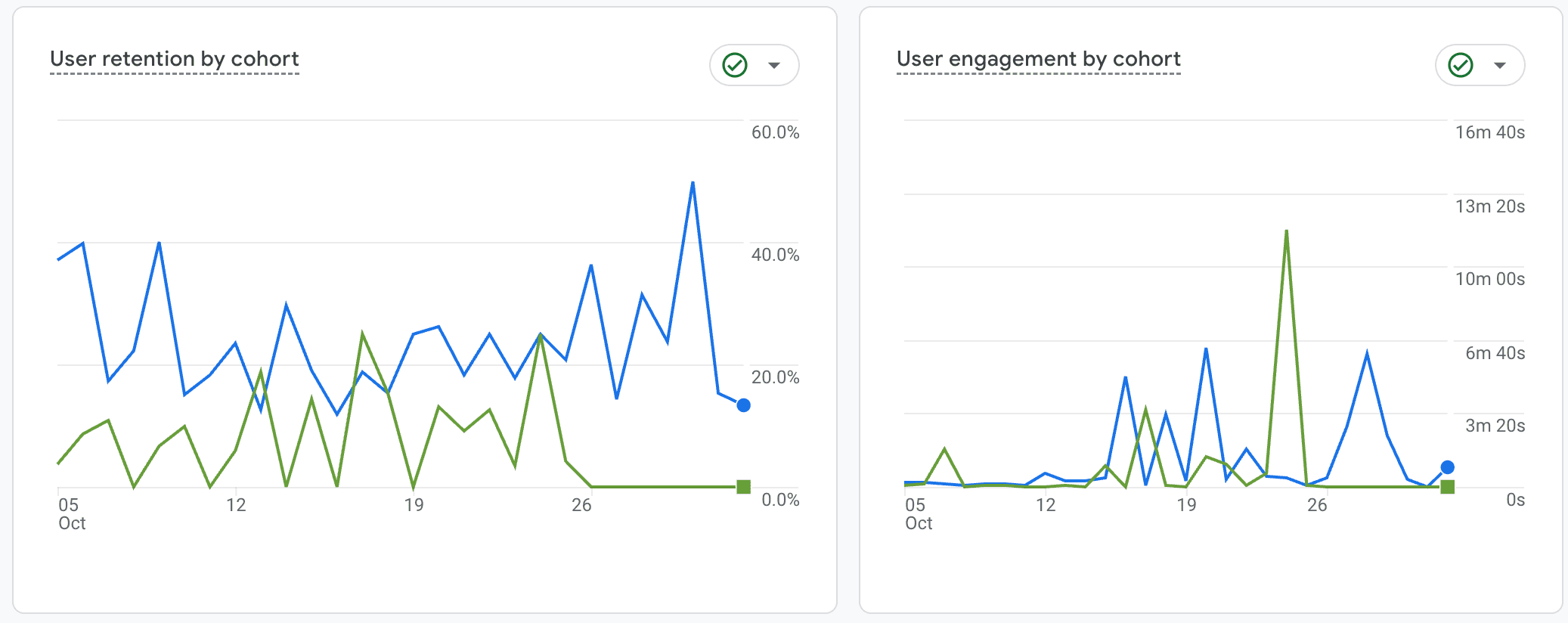
- Cohort Retention
- Definition: Retention measured for a specific group (cohort) of users who started using your app at the same time (e.g., all users from May).
- Why It Matters: Helps you understand how product changes, feature releases, or marketing campaigns impact user behavior over time.
Helps you understand how product changes, feature releases, or marketing campaigns impact user behavior over time.
How to Improve Activation Rate with Push Notifications
Activation isn't just one moment; it's a journey to value. A user downloads your app, but they aren't "activated" until they send their first message, create their first project, or complete their first workout. Your job is to guide them to that point as quickly as possible.
Push Notification Strategies for Activation:
- Welcome Series: Don't just send one "Welcome!" notification. Create a 3-day workflow that guides users through key setup steps.
- Day 1: "Welcome to [App Name]! Let's set up your profile to get started."
- Day 2: "Did you know you can [Key Feature]? Tap here to try it out."
- Day 3: "You're almost there! Complete [Final Activation Step] to unlock the full experience."
- Action-Based Triggers: Send a notification immediately after a user completes a key action to encourage the next one. For example, after they add one friend, prompt them to add three more to create a group.

Expert Insight: "Habit formation is the most powerful retention force known to mobile apps" - JD, Product Manager at Flywheel Studio
Additional Reading: How to Create a Powerful Onboarding Push Notification Workflow
How to Reduce Churn Rate with Push Notifications
Churn is the percentage of users you lose. It often goes unnoticed because it's easier to celebrate new signups than to analyze who has left. If you have a subscription model, a canceled payment is a clear signal. If not, you must define churn as a period of inactivity (e.g., no sessions in 30 days).
Push Notification Strategies for Reducing Churn:
- Pre-Renewal Reminders: For subscription apps, send a notification 3-5 days before a payment is due. This reduces the "surprise" of a charge and gives you a chance to remind them of the value they're receiving.
- Inactive User Re-Engagement: Create a workflow in PushFire that triggers when a user has been inactive for a set period (e.g., 14 days). Send a notification highlighting a new feature or offering a reason to come back.
- Value-Based Notifications: Don't let your app be forgotten. If a user hasn't logged in for a week, send a notification about something relevant to them, like "Your weekly progress report is ready!"
Additional reading: Re-engaging-Inactive-Users
How to Increase Retention Rate with Push Notifications
Retention is the opposite of churn—it's your ability to keep users coming back. The key is understanding your app's natural usage frequency. A social media app aims for daily retention, while an airline app might aim for quarterly or annual retention.
Push Notification Strategies for Increasing Retention:
- Habit Formation Loops: If your app is designed for daily or weekly use (e.g., fitness, meditation), set up recurring notifications that act as gentle reminders to build a routine.
- Milestone Celebrations: Automatically congratulate users when they achieve something in your app. "Congrats! You've just completed your 10th workout!" This positive reinforcement encourages continued engagement.
- Content & Feature Updates: When you release a new feature or add new content, use a push notification to bring users back to check it out.
Expert Insight: "We track each release date and its features so we can see how these impact retention across different user cohorts. This is only possible by tracking the releases and manually reviewing them against cohort data. It tells us which features truly move the needle on long-term engagement." — Erik Goins, Founder of Flywheel Studio a mobile development agency
The Truth About DAU & MAU (And When to Use Them)
DAU and MAU are the most referenced metrics, but they can also be the most misleading. They are often "vanity metrics"—numbers that look good on paper but don't always reflect a healthy business.
The Two Key Risks of Focusing Only on DAU:
- Wasted Ad Spend: It's easy to increase DAU by spending more money on ads. But if those new users open the app once and churn immediately because it's not a good fit, you've gained nothing.
- Wrong Business Focus: Not all apps need high DAU. An airline or a tax-filing app would be foolish to try and drive daily usage. Doing so could annoy users and hurt the app's core effectiveness.
How to Use DAU/MAU Correctly: Track DAU/MAU in combination with retention and activation. If DAU is increasing but your 7-day retention is falling, you have a "leaky bucket." Your acquisition is working, but your product experience is failing to keep users engaged. Use push notifications to guide those new daily users toward your activation events.
[Advanced] Segmenting Your Metrics for Maximum Impact
Your overall metrics are an average across all your users, which can hide important truths. To get real insights, you must segment your data.
For example, the fitness app Primus is designed for elite athletes training for the special forces. If they looked at metrics for everyone who downloaded the app, they would see massive churn. This isn't "bad" churn; it's the app correctly filtering out users who aren't in its target audience.
The most valuable insights come from segmenting your metrics by your ideal customer profile.
Common Segmentation Strategies:
- Behavioral: Paid Users vs. Free Users
- Demographic: Country, Language
- Technographic: iOS vs. Android, Device Type
PushFire allows you to create user segments and build targeted workflows for each. This ensures your "Welcome" message for a user in Japan is different from one for a user in Brazil, and the notifications you send to a power user are different from those you send to a new user.
Conclusion: Turn Metrics into Action
Metrics are not just numbers on a dashboard; they are feedback loops that tell you how users experience your app. The point isn't just to track them—it's to improve them.
By defining a key metric like Activation as "Creating a Group," you establish a baseline. From there, you can use a tool like PushFire to experiment:
- Can we send a push notification to a user who joins a group but hasn't created their own?
- Can we trigger a reminder if a user is active for 7 days but still hasn't completed this key action?
This is why we built PushFire. It empowers you to act on your data, build intelligent engagement workflows, and systematically improve the metrics that matter most to your app's success.
Ready to Turn Your App Metrics into Action?
Stop guessing and start engaging. See how PushFire's visual workflow builder makes it easy to improve retention, reduce churn, and activate your users. Start using PushFire for free.